With more people using cryptocurrency every day, it makes sense for Canadian businesses to offer crypto payment options. Crypto is fast and, depending on the network, cheap to send.
Giving customers the choice to pay in crypto can bring in more buyers, and it signals that your business is forward-thinking and adaptable. It can also mean lower fees, no card chargebacks and a simpler checkout that reduces cart abandonment.
If you are not sure which crypto payment processor to use, I have reviewed six of the main ones. Below you will find the fees I could verify on each provider's own site, how each one settles, and which one fits which kind of business.
BitPay works in Canada: BitPay Inc. is registered with FINTRAC as a money services business and lists CAD as a settlement currency, so it can pay you in Canadian dollars at a bank. It costs 2% plus 25 cents per transaction under US$500,000 a month, which is why smaller shops often look elsewhere. For a Canadian business, EukaPay is my top pick: it is registered with FINTRAC as a money services business and is built around Canadian payouts. NOWPayments is the broadest option, with 350+ coins and a starting fee of 1%. Blockonomics suits a bitcoin-only shop that wants payments sent straight to its own wallet, and BitPay suits a larger merchant that wants CAD settled to a bank account.
Best Overall For Canada: EukaPay
Most Coins: NOWPayments
Self-Custody Bitcoin: Blockonomics
CAD Bank Settlement: BitPay
Crypto Payment Gateways For Canadian Businesses Compared
Gateway
My Score
Fee
Settlement
Canadian Registration
EukaPay
9.8
Not published on its site
Crypto or fiat payouts
FINTRAC MSB (NUCL Technologies Inc.)
NOWPayments
9.3
1% starting fee
Crypto, with fiat conversion
Not checked
CoinsPaid
9.2
Not published on its site
Not published
Not checked
Blockonomics
9.1
First 10 payments free, then 1%
Direct to your wallet
Not checked
BitPay
9.0
2% + 25 cents under US$500,000 a month
USD, EUR, GBP, CAD, AUD, NZD, MXN, crypto or stablecoins
FINTRAC MSB (BitPay Inc., US)
CoinGate
8.2
1% on the Standard plan
EUR, GBP, USD or crypto
Not checked
Fees and settlement come from each provider's own pricing page on October 1, 2026. FINTRAC status comes from the FINTRAC money services business registry. "Not checked" means I did not find the provider in the registry, so confirm it before you sign up. Network fees are extra with every provider.
Which Crypto Payment Gateway Is Best For Canadian Businesses?
Six gateways, in the order of my score. The fees below are the ones each provider publishes, not the ones I reported in earlier years.
Blockonomics1% after 10 free
NOWPayments1% start
CoinGate1%
BitPay (under US$500K)2% + 25c
1
EukaPay: Best Crypto Payment Gateway For Canadian Businesses
9.8/10
Best for: Canadian businesses that want invoices, a checkout button and Interac on and off-ramps in one tool
Settlement: Receive crypto or fiat, with crypto payouts and mass disbursements by CSV or API
Registration: FINTRAC MSB M22233887, held by NUCL Technologies Inc.
Fee: Not published on the site, so ask before you commit
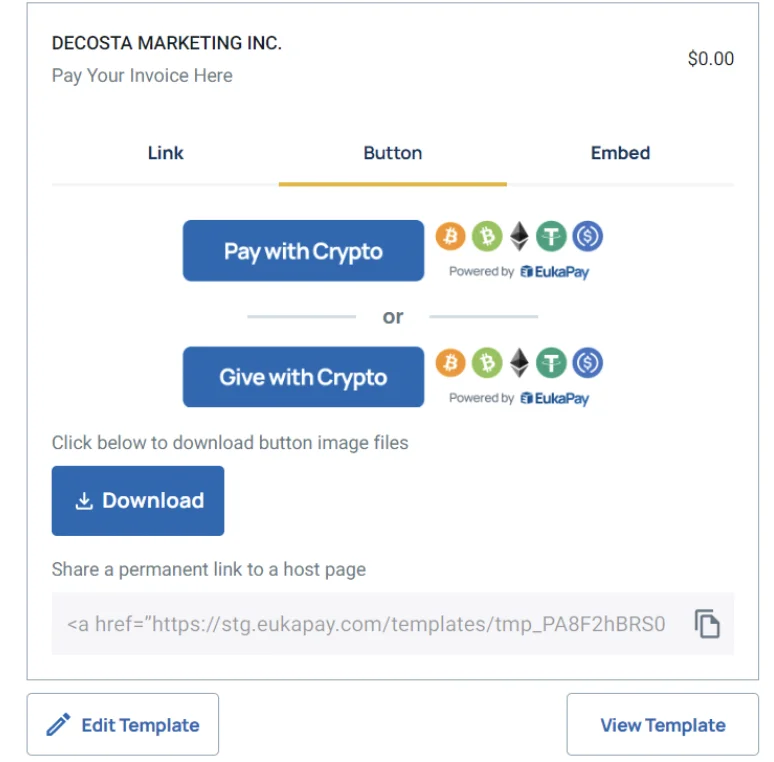
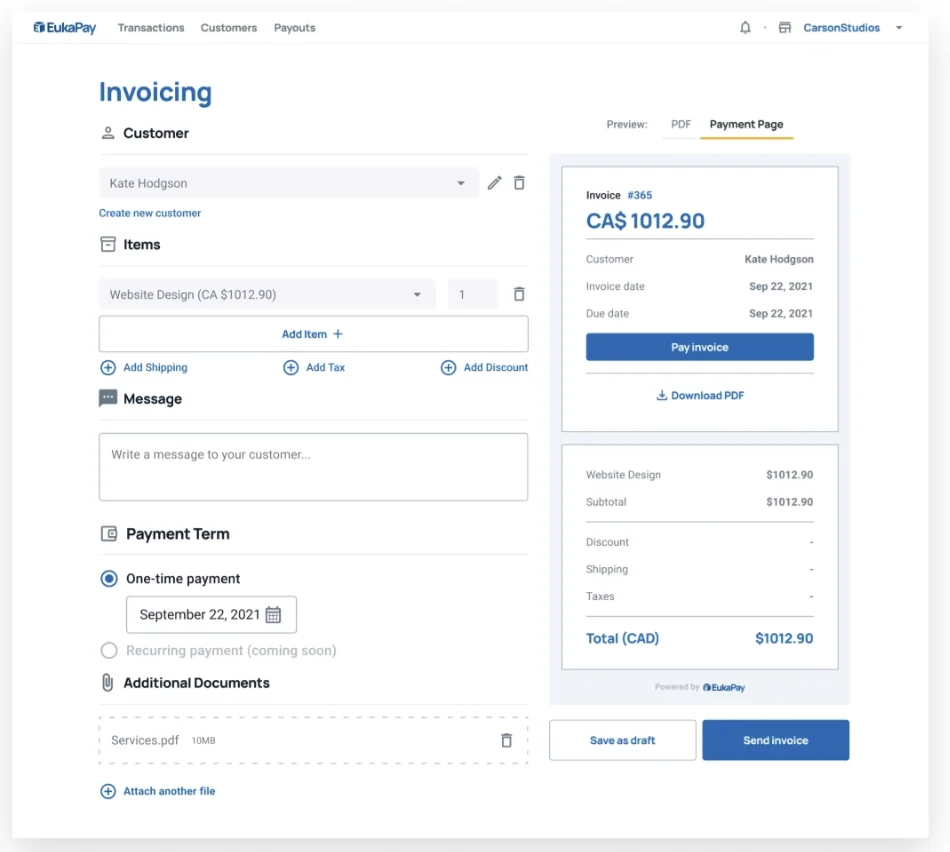
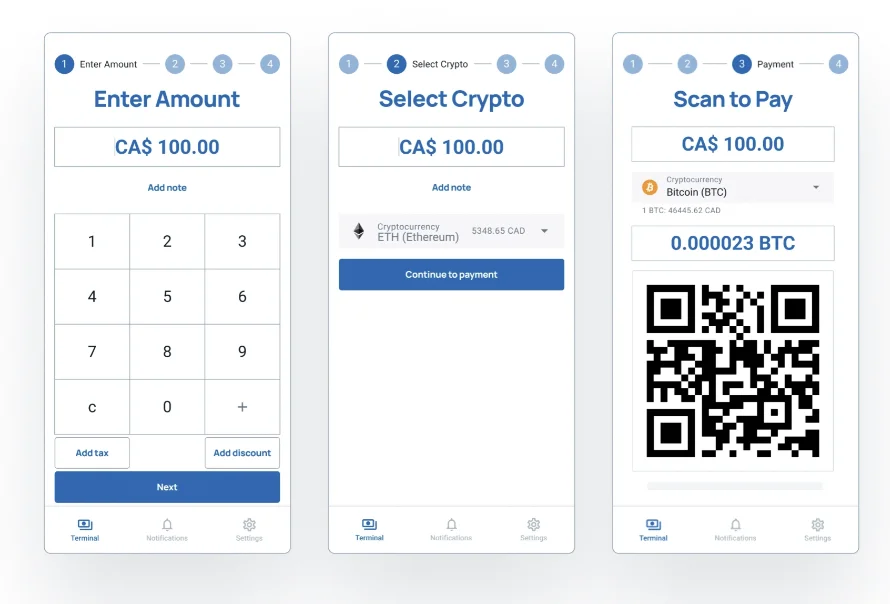
EukaPay stands out for Canadian businesses because it handles the whole flow: you can accept crypto and receive payments in your preferred form, and it incorporates accounting and analytics features that let you create invoices, receive crypto payments and track transactions in real time. It offers flexibility in payment reception, in dollars or stablecoins, through invoices, a "pay with crypto" website button or physical terminal payments at retail locations.
Its non-custodial on and off-ramp lets you exchange dollars for cryptocurrency via Interac e-Transfer, with the crypto sent directly to your wallet. EukaPay advertises no chargebacks and no rolling reserve, which is worth confirming in your own contract.
Accepting payments is simple in the app: it generates QR codes for customers at your service point and lets you build customizable invoices for online orders. You can also create custom payment options for unique service fees or products.
The dashboard gives you an overview of transactions, payments and bank payouts, with branding and security settings. The FINTRAC registration is the detail I weigh most: a registered Canadian MSB gives you a compliance footing that most offshore processors cannot show. I did not find a published fee on its site, so request the rate in writing.
Oleg's takeI integrated EukaPay on one of my sites. The integration was so-so, and the processing came out a bit more expensive than I expected, so get the full fee schedule in writing before you commit.
Pros
FINTRAC-registered Canadian operator
Invoices, payment links, checkout button and POS in one tool
Best for: Online shops that want the widest coin choice at a low starting fee
Fee: 1% starting fee, with loyalty discounts; network fees are extra
Coins: 350+ cryptocurrencies and 75+ fiat currencies
Scale: 30 million+ finished transactions a month and $10 billion processed since 2019, per its site
Custody: Not stated on its homepage
NOWPayments is a reputable digital currency payment gateway that lets you accept bitcoin, Ethereum, Litecoin, Dogecoin, Cardano and many other altcoins. Its site now lists 350+ coins, up from the 50+ I reported before.
You can charge your customer in crypto or fiat, and its site describes conversion in both directions. Because the conversion fee schedule has changed, read its current fee page before you set prices. If your customer pays in a different currency than the one you accept, expect a conversion cost on top of the 1% starting fee.
Pros
350+ cryptocurrencies
1% starting fee with loyalty discounts
Fiat and crypto conversion
Scale and track record
Cons
Conversion and withdrawal fees vary, so read the schedule
Best for: Larger businesses willing to talk to sales
Products: Enterprise for financial institutions and Console for self-hosted control
Fee: Not published on its site
Coins: Not published on its site
Regions: Lists the EU, USA, India, Malaysia, Australia and Argentina
CoinsPaid is a reputable crypto payment processor that lets a business accept crypto and choose whether to receive crypto or fiat. For example, the customer pays in bitcoin and you hold it, pay partners with it or have it converted to a fiat currency of your choice. We think CoinsPaid is a fit for larger merchants.
Its public site focuses on its two products and does not publish fees, a coin list or plugin details, and Canada is not on its list of operating regions. That is why I would contact sales and confirm Canadian availability, pricing and CAD settlement in writing before building anything around it.
Blockonomics: Best For Self-Custody Bitcoin Payments
9.1/10
Best for: Freelancers and small shops that want bitcoin paid straight to their own wallet
Fee: First 10 payments free, then 1% on all payments
Custody: Payments go direct to your wallet, with no third party holding funds
Integrations: 20+, per its pricing page
Support: 24/7 by ticket or chat
If you want a gateway that focuses on bitcoin, Blockonomics is a good choice. You can accept bitcoin payments online, or create invoices in fiat and receive bitcoin. Payments made to you online go directly to your bitcoin wallet, and if you use its invoicing option, the tool adjusts the bitcoin amount for market moves so you receive the right value.
It is a simple option for a business that wants bitcoin and wants to keep it without converting to fiat. It is also a cheap one: the first 10 payments are free and the 1% fee starts after that. Check its supported coin list on the site, since I could only confirm its bitcoin focus.
Pros
Funds go direct to your wallet
Free for your first 10 payments
1% fee after that
Sales dashboard and accounting tools
Cons
Bitcoin-focused, so coin choice is narrower
No fiat settlement, so you handle conversion yourself
Bank Payouts: Daily fiat settlement direct to your bank account
Registration: FINTRAC MSB M23611454, held by BitPay Inc. in the US
BitPay is popular among online and retail businesses and is one of the most established crypto payment processors. It offers payment buttons, hosted checkouts, invoices and other tools. When a customer pays, BitPay converts the crypto to your local currency and settles it to your bank, and its site lists CAD among the settlement currencies.
The price has changed since I last wrote this up. BitPay's 1% fee is now the top tier, which applies from US$1,000,000 a month in volume. Below US$500,000 a month, it is 2% plus 25 cents per transaction, and its pricing page notes higher fees for high-risk industries. It also lists daily fiat settlements and no card-style fraud chargebacks.
BitPay offers plugins for Shopify, WooCommerce and other stores, so integration is straightforward for most merchants. We think it suits a larger business that values reputation and bank settlement over the lowest fee.
Best for: European-facing merchants who settle in EUR or USD
Fee: 1% on the Standard plan, with custom Enterprise pricing
Settlement: EUR, GBP, USD or crypto
Withdrawals: Crypto and SEPA free over a 50 EUR minimum, SWIFT 0.50%
Plugins: WooCommerce, PrestaShop, WHMCS, OpenCart and Wix
CoinGate lets a business accept many cryptocurrencies and settle in euros, pounds, US dollars or crypto. A customer picks a coin, CoinGate generates the invoice, and the payment settles in the form you choose. You can integrate with its API or use plugins.
The catch for Canadians is that its listed settlement currencies do not include CAD, so you would need to convert on your side. If you sell mostly to Europe, that is less of an issue.
What Should I Look For In A Cryptocurrency Payment Gateway?
As crypto becomes more mainstream, more people want to pay for goods and services with it, and businesses are taking note. If you own a business and want to accept crypto, you will need a payment gateway that integrates with your website or app. Here is what I weigh when I compare processors.
Fees
Fees are the first filter. Compare the processing percentage, the fixed fee per transaction, the conversion cost and the withdrawal cost, and ask what is not on the pricing page. A crypto gateway can cost less than a card processor, but you are paying a third party for the integration, so always check for extra fees.
Taxation And Financial Reporting
CRA generally treats cryptocurrency like a commodity, and when you pay for goods and services with crypto, it is treated as a barter transaction. As the vendor, you report the fair market value of what you sold as income. Your gateway should connect each payment with the order, give you exportable sales reports and offer invoicing, because crypto tax is complicated enough already.
Technical Integration
Check how easily the gateway fits your website or app, and that it supports the coins you want to accept. The checkout should look and feel familiar to customers, who are used to paying by card.
Security And Reliability
Read reviews, check whether the provider is registered, and see how it holds funds. Crypto moves wallet to wallet, so while no bank is involved, the gateway in the middle still has to be secure and reliable. For Canadian merchants, a FINTRAC MSB registration is a good first sign.
Speed
A slow checkout loses sales. Part of the delay depends on the network, but the checkout itself should be quick or customers may not return.
Customer Support
If something goes wrong with your gateway, you will want help when you need it. Check what support hours a provider offers, and whether phone support matters to you.
How Do I Set Up Crypto Payments For My Canadian Business?
Pick how you want to be paid. Crypto into your own wallet (Blockonomics), or converted and settled to your bank (BitPay lists CAD).
Check the provider's Canadian status. Look the company up in the FINTRAC money services business registry, and read its fee page, not a review.
Get fees and settlement in writing. Network fees are extra with every provider, and conversion and withdrawal costs vary.
Add the checkout. Use the plugin, payment button or invoice tool, then run a small test payment before you go live.
Record every payment. Keep the date, the amount in CAD at that moment and the order it belongs to.
Do I Charge GST/HST On Crypto Payments?
The way a customer pays does not decide whether tax applies. If you are a GST/HST registrant and you accept crypto for goods or services, CRA says you calculate its value for GST/HST purposes at fair market value at the time of the transaction. For income tax, a sale paid in crypto is a barter transaction, so you report the fair market value of what you sold as business income. CRA also expects books and records for every crypto transaction. An accountant who has handled crypto is worth the fee here.
Which Crypto Payment Gateway Fits My Business?
Match the gateway to how you want to be paid. Want a Canadian operator with Interac rails and invoices: EukaPay. Want the most coins: NOWPayments. Want bitcoin straight into your own wallet: Blockonomics. Want CAD in your bank at larger volume: BitPay. Sell mostly in Europe: CoinGate. If your customers are buying coins first, point them to my best crypto exchanges in Canada.
What Changed For Crypto Payment Gateways In October 2026?
NUCL Technologies Inc., which operates EukaPay, registered with FINTRAC as an MSB. The registration runs to November 30, 2027.
BitPay Inc. registered with FINTRAC as an MSB. The registration runs to August 20, 2028.
BitPay lists 2% + 25 cents under US$500,000 a month, with 1% + 25 cents only from US$1,000,000.
NOWPayments lists 350+ coins, and Blockonomics gives your first 10 payments free before its 1% fee starts.
Frequently Asked Questions
Does BitPay Work In Canada?
Yes. BitPay Inc. holds a FINTRAC money services business registration, and BitPay lists CAD among its settlement currencies, so a Canadian merchant can have payments converted and paid to a bank account. Its fee is 2% plus 25 cents under US$500,000 a month. I could not confirm on BitPay's site that its consumer card is offered to Canadians, so check that on BitPay before you count on it.
What Is The Best Crypto Payment Gateway In Canada?
For a Canadian business I rate EukaPay highest, because it is registered with FINTRAC and offers invoicing, checkout buttons and Interac e-Transfer on and off-ramps. NOWPayments is the better choice if you need the widest coin selection.
How Much Do Crypto Payment Gateways Charge?
NOWPayments starts at 1%, Blockonomics charges 1% after your first 10 payments, CoinGate charges 1% on its Standard plan and BitPay charges 2% + 25 cents under US$500,000 a month. Network fees are extra, and EukaPay and CoinsPaid do not publish fees on their sites.
Can I Get Paid In Canadian Dollars?
BitPay lists CAD among its settlement currencies. CoinGate's listed settlement currencies are EUR, GBP, USD or crypto. EukaPay describes bank payouts but does not publish its CAD details, so ask it directly.
How Does CRA Treat Crypto Payments To My Business?
CRA generally treats cryptocurrency like a commodity, and a purchase made with crypto is a barter transaction. As the vendor, you report the fair market value of the goods or services as income. Speak to an accountant about your situation.
Do I Need A Wallet To Accept Crypto Payments?
It depends on the gateway. Blockonomics sends payments straight to your own wallet. Others, such as BitPay, can convert the payment and settle fiat to your bank, so you do not need to hold crypto at all.
Is A Crypto Payment Gateway Cheaper Than Card Processing?
It can be, but compare the full cost. Some gateways charge 1% while BitPay's entry tier is 2% + 25 cents. Add conversion and withdrawal fees, and check your own card processor's rate before you decide.
Do I Charge GST/HST When A Customer Pays In Crypto?
Payment method does not change whether you charge GST/HST on your goods or services. If you are a GST/HST registrant, CRA says you work out the value of the crypto for GST/HST purposes at its fair market value at the time of the transaction. Confirm the details with an accountant.
Author
Oleg Galeev
Cryptocurrency Specialist
Oleg is a Canadian citizen & crypto expert who has been trading since 2016. He started out with Coinbase, Kraken and Peer-to-Peer exchanges. After some time, centralized exchanges started charging crazy fees to their users.
He decided to review different crypto exchanges that operate in Canada and start a Youtube channel in order to educate Canadians on what kinds of things are going inside each one while giving them unbiased advice. On top of that, Oleg also has experience with NFT, airdrops, and crypto staking and he is constantly checking on new crypto assets.
His writing has been featured in popular Canadian media sources such as Toronto Sun and Ottawa Citizen.
Discover Your Perfect Canadian Crypto Exchange!
Answered 0 of 10
Please assign a score to each question. This ensures we understand your priorities and can recommend the best crypto exchange for your needs.