

Yes, you can file crypto taxes in TurboTax Canada. Capital gains from casual trading go on Schedule 3, where the CRA taxes half of the gain, and mining or trading as a business goes on form T2125, according to TurboTax’s own crypto guide. What TurboTax does not appear to do is calculate your gains from raw exchange history, so you need a record of every sale or trade first. I use crypto tax software for that step and then copy the totals across.
- Capital gains: Schedule 3, half of the gain is taxable (CRA)
- Business or mining income: form T2125
- Records: keep them for six years from the end of the last tax year they relate to (CRA)

| Type Of Activity | Where It Is Reported | How It Is Taxed |
|---|---|---|
| Selling, trading or spending crypto as an investor | Schedule 3, capital gains | Half of the gain is included in income |
| Trading or mining as a business | Form T2125 | Business income, valued when earned |
| Staking rewards on a centralized exchange | Income | Generally income when credited to your wallet |
| Moving crypto between your own wallets | Not reported as a sale | Not a disposition (CRA) |
The inclusion rate is one half. The proposal to raise it to two thirds was cancelled on March 21, 2025.
Is TurboTax Good Enough For Crypto Taxes In Canada?
If you’ve ever bought or sold cryptocurrency then you’ll need to disclose that information on your tax return. The problem is that cryptocurrency taxes can be confusing depending on the nature of your crypto activities. Staking is considered income, yet selling crypto could incur a capital gain.
It is beneficial to use crypto tax software to help you file your crypto taxes and to make sure you’re paying the right amount of tax each year. TurboTax is software that Canadians can use to file their taxes. While TurboTax is a good tax software that can help you easily file simple taxes, it is not the best for crypto taxes in Canada.

Crypto taxes are complicated and the more transactions you have the harder it is to keep track and calculate everything correctly. TurboTax’s crypto guide explains where the numbers go, but it does not mention a tool that helps you file crypto taxes easily from your transaction history.
I could not find a native import feature in TurboTax, meaning you would not be able to connect your crypto wallets or import your transactions from crypto exchanges. Check the current product before you rely on this. In my own filing, I had to use additional software to gather all of the required information.
Do I Need Crypto Tax Software If I Use TurboTax?
If you do not trade crypto often, or you stake only one crypto then you may be able to easily keep note of your crypto transactions and income yourself. It’s often a good idea to keep a record of your crypto trading anyway, just in case the Canada Revenue Agency ever wants to see it. The CRA asks you to keep the number of units, the date and time, the value in Canadian dollars, a description of each transaction, and wallet addresses, for six years from the end of the last tax year. It does not endorse any software product.
If you use TurboTax to file your crypto taxes in Canada, then it is recommended to also use a crypto tax software to help you calculate your crypto income and capital gains. We recommend Koinly.

Koinly is a crypto tax software that crypto traders use worldwide. Unlike TurboTax, Koinly lets you import all of your crypto transactions from wallets and exchanges. It is easy to use and with a few clicks, Koinly will calculate your capital gains and add up all of your crypto income. You can check our Koinly review here.
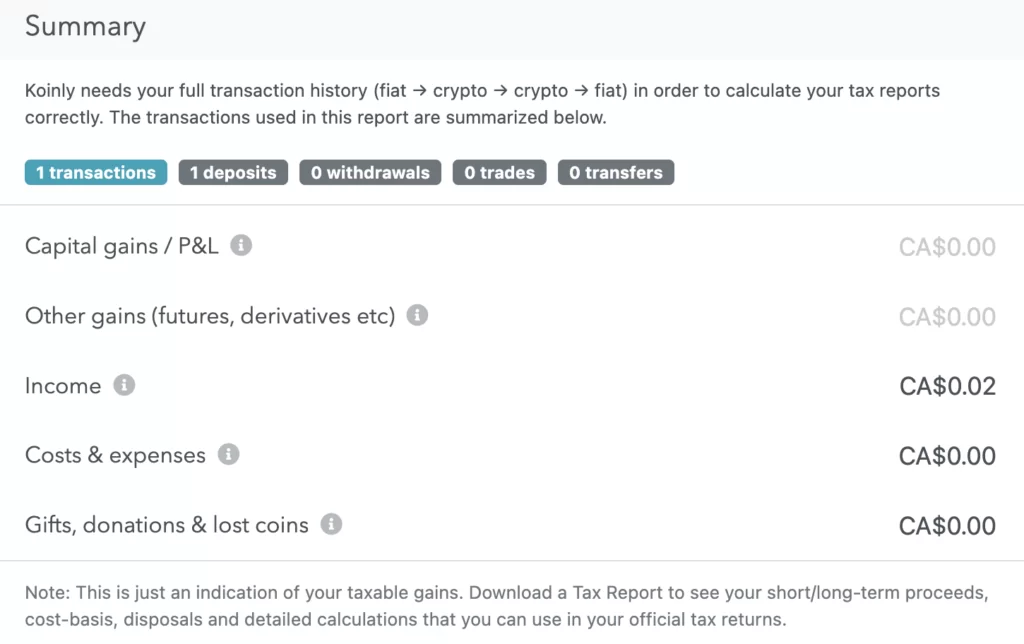
You can simply search for your crypto exchange or wallet and import your transactions directly. You can import from as many exchanges or wallets as you need.
Koinly will calculate profits and losses based on the prices of the cryptocurrencies at the time in which you bought and sold them. The software does this automatically and you will be able to see all of this and adjust anything that is incorrect under “transactions”.
Koinly will also label transactions such as “reward” “transfer” or “income” but you can relabel anything if it’s not correct. Anytime you do, Koinly will readjust its calculations automatically.

Koinly is free to use but to generate reports such as capital gains or income reports, you will need to select one of the paid accounts depending on your needs. Check Koinly’s pricing page for the current plans. We think the price of Koinly is worth it to save you the headache of calculating everything yourself.
How Do I Enter Koinly Reports Into TurboTax?
Once you have used Koinly to generate your various crypto reports, you can view them or download them to your computer. You will need these reports to help you input the correct figures into TurboTax.
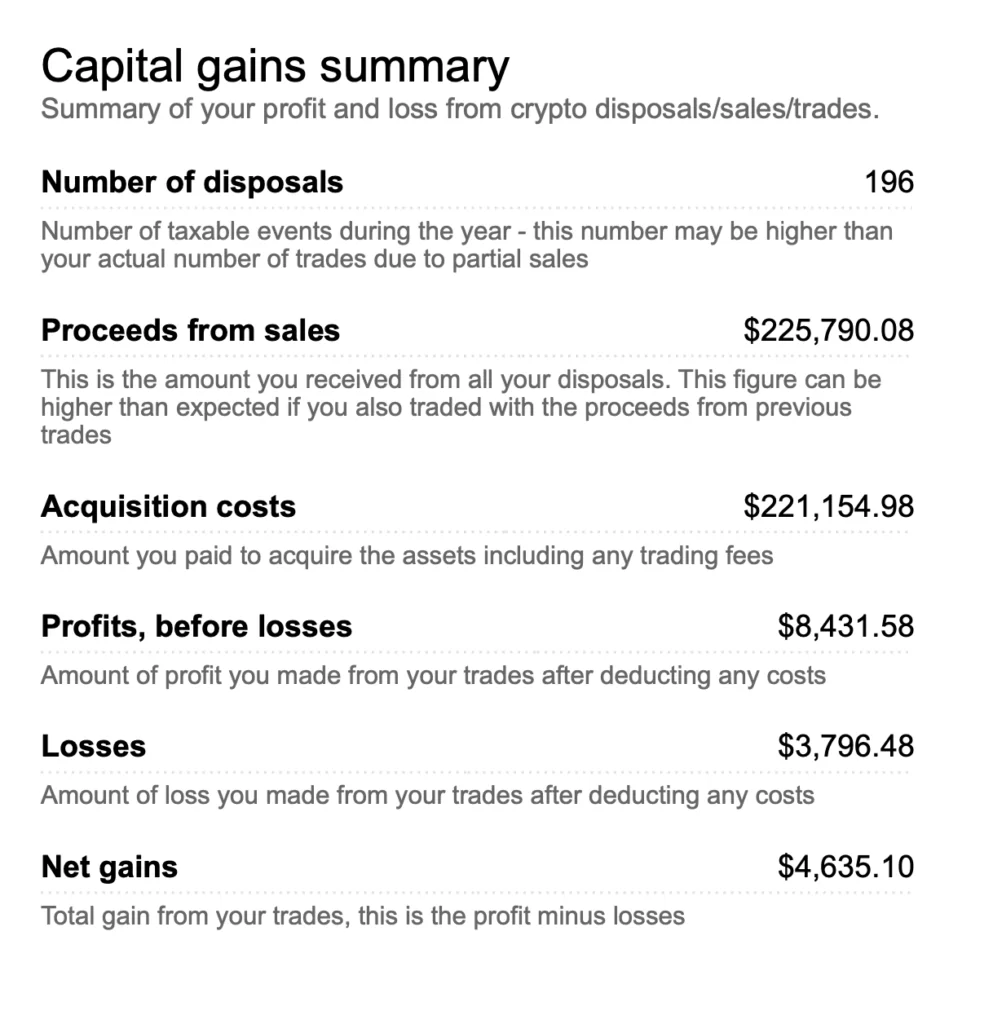
For example, in the capital gains section of TurboTax, for “Adjusted cost base” copy and paste the “Acquisition costs” figure from the capital gains section of your Full Tax Report from Koinly.
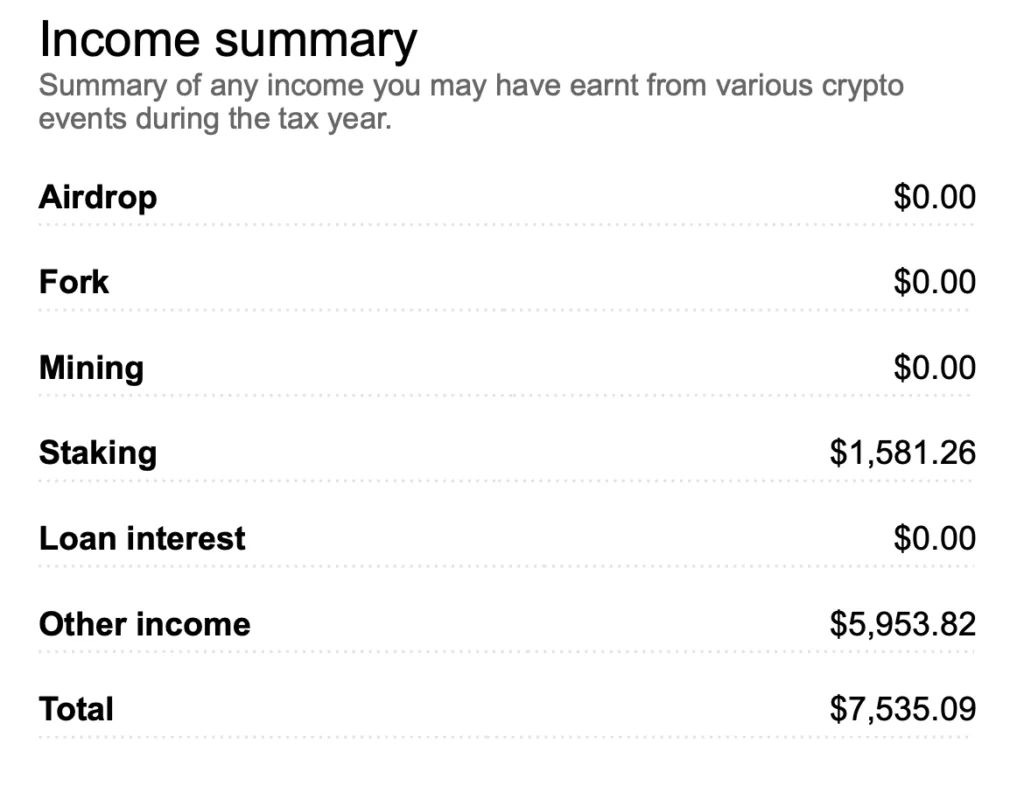
In the income section in TurboTax where it asks for “interest and other investment income” enter the “total” figure from the income section of your Full Tax Report that you get from Koinly. If your crypto activity is a business, the income belongs on form T2125 instead, so ask an accountant which applies to you.
The fewer crypto transactions you have the less complicated your crypto taxes will be. However, if you’re unsure about anything at all then it is best to contact a tax professional. Koinly does, however, have many useful articles and guides on its website to help you understand the various aspects of crypto taxes.
Whether you use TurboTax to file your crypto taxes in Canada or another tax software, we recommend using Koinly to easily calculate all of your crypto income and capital gains.
What Changed For Crypto Taxes In October 2026?
- TurboTax Canada’s crypto guide was updated, pointing casual traders to Schedule 3 and business activity to form T2125.
- The federal government cancelled the proposed capital gains inclusion rate increase. The inclusion rate stays at one half.
- The CRA updated its cryptocurrency guide pages on records, valuation, and mining and staking income.
- The CRA updated its page on income from crypto transactions, which still shows half of capital gains being included.
Frequently Asked Questions
Does TurboTax Canada Support Crypto?
You can report crypto on a TurboTax return. TurboTax's own guide says capital gains go on Schedule 3 and mining or business income on form T2125. I could not find a crypto import tool in that guide.
Where Do I Report Crypto Capital Gains In Canada?
On Schedule 3 of your return. The CRA includes half of a capital gain in your income. The proposal to raise that share was cancelled on March 21, 2025.
Do I Have To Report Crypto If I Only Held It?
Buying and holding is not a sale. You report when you dispose of crypto: selling it, trading it for another coin, or spending it. Moving it between your own wallets is not a disposition.
What Records Does The CRA Want For Crypto?
The number of units, date and time, value in Canadian dollars, a description of each transaction and wallet addresses, kept for six years from the end of the last tax year. The CRA does not endorse any software product.
Is Koinly Free?
In my experience you can import and view transactions for free, but you need a paid plan to download tax reports. Check Koinly's pricing page for the current plans.
Should I Hire An Accountant For Crypto Taxes?
If you trade often, stake, mine or are unsure whether your activity is a business, yes. Software calculates, but it does not decide how the CRA classifies you.