

Verdict: Koinly is the crypto tax tool I have used since 2020, and I rate it 9.5/10. It imports from exchanges and wallets, works out your gains using Canadian average cost, and produces the reports you attach to your return, including the one for Schedule 3. The catch is that the free plan shows your imported data but not your capital gains or downloadable reports, so you pay once you want the forms.
- Best for: anyone who has done more than a handful of trades, swaps or staking payouts in a year.
- Plans: Newbie up to 100 transactions, Hodler up to 1,000, Trader up to 3,000, bought per tax year.
- Skip it if: you only bought and held, or sold a few times. A spreadsheet will do.
| Item | Detail |
|---|---|
| My score | 8.4 out of 10 |
| My use | Since 2020, including my 2023 taxes |
| Free plan | Import up to 10,000 transactions and see your data. No reports and no capital gains view |
| Newbie | $49 per tax year, up to 100 transactions |
| Hodler | $99 per tax year, up to 1,000 transactions |
| Trader | $199 per tax year, up to 3,000 transactions |
| Imports | API, public wallet address, or CSV file |
| Canadian output | Capital gains report for Schedule 3, TurboTax integration |
| Pricing model | Paid per tax year, not a subscription |
Plan prices are as listed on koinly.io when I checked. I could not load a CAD-priced version of the page, so look at the currency shown at checkout before you pay.
Koinly is a tool I have been using since 2020, and it has been a game-changer for handling crypto taxes. I think of it as the TurboTax for crypto: straightforward, intuitive, and it makes an otherwise painful process much easier.
In Canada, any crypto-to-crypto swap or sale is a taxable transaction (more in my Canadian crypto taxation guide), and these add up through the year. Before you know it, you are staring at over 100 transactions that need to be tracked, calculated and reported to figure out your capital gains. It is a daunting task, but Koinly takes the headache out of it.
The process is extremely smooth, and you can tell the developers put a lot of effort into building it. It connected smoothly to the Canadian exchanges I used, such as Newton and Coinbase, and you can import transactions from hardware wallets too.
One honest caveat on the "CRA-compliant" claim. The CRA says it does not endorse specific software products. What it does ask for is accurate records: CAD value at the time of each transaction, dates, wallet addresses and so on. Koinly states that Canadian accounting firm MNP assessed its calculations as consistent with CRA guidance and the adjusted cost base method. That is Koinly's claim, not a CRA stamp.
This Koinly review is not sponsored and is based on my personal experience using the tool since 2020. If you decide to try Koinly, you can use my referral link to get 10% off their pricing plans, which also supports my independent content.
What Are The Key Koinly Features For Canadians?
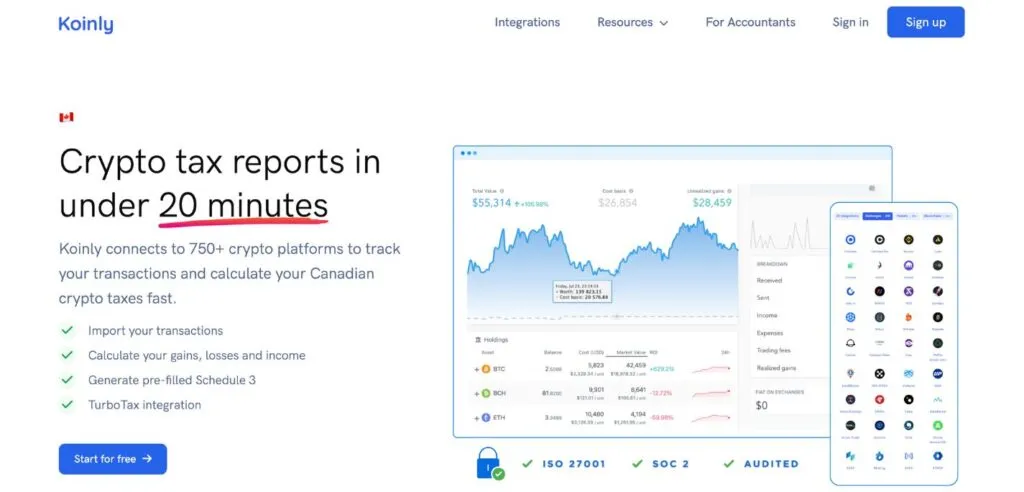
Koinly offers several features that make handling crypto taxes convenient for Canadians. You can connect your crypto wallets and Canadian crypto exchanges via CSV file, API or public address, so you do not have to type in transactions. Many of them sync automatically. Once imported, you get a breakdown of every transaction and a view of your gains and losses. Generating the tax forms, like the Schedule 3 report for the CRA, takes a few clicks.
What I find handy is the TurboTax integration, which saves time if you file yourself. Technically you do not even need an accountant. That said, I am a bit old-school with taxes: I still print out Schedule 3 and hand it to my accountant to double-check everything.
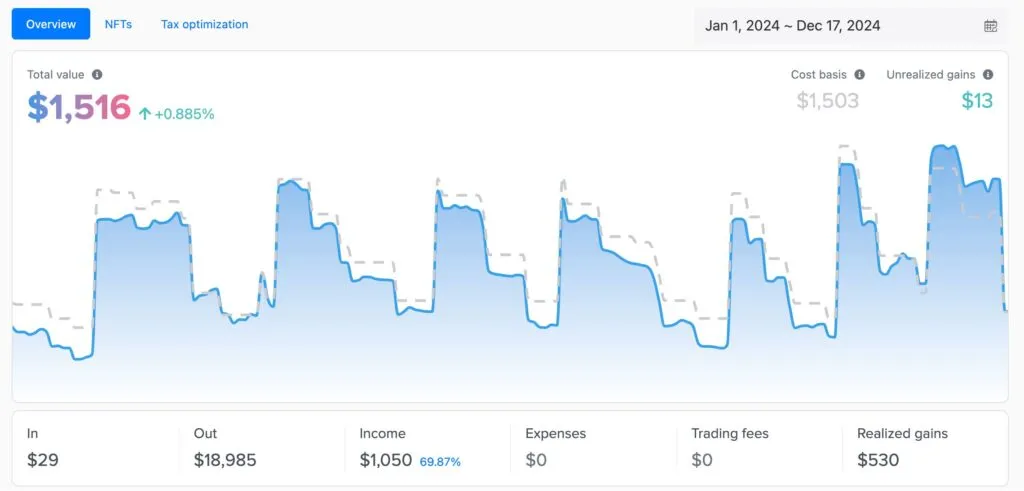
Beyond taxes, Koinly gives you a useful overview of your crypto. The dashboard is clean, showing how much you have made or lost, along with your cost basis, holdings and fees paid.
If you run into issues, Koinly has a large support center full of help articles.
Pros
- Easy to import your transactions
- Quickly generate the forms you need
- Follows the CRA's rules for capital gains and income on crypto
- Tracks lending, staking, deposits and withdrawals
- Good for beginners and experienced traders
- Easy-to-use interface
Cons
- You must check everything by hand; it is not always right
- You need a paid plan to see capital gains and download reports
- Plans cost more as your transaction count grows
Does Koinly Work In Canada?
Yes. It calculates gains with the Canadian average cost method, produces the capital gains report you use for Schedule 3, and integrates with TurboTax. That is what makes it a Canadian tool and not just a US one with a flag on it. For tax documents the CRA asks for, see the records section below. If you want to check your rough numbers before you pay for anything, my free Canada crypto tax calculator is a quick start.
Which Canadian Crypto Exchanges Does Koinly Support?
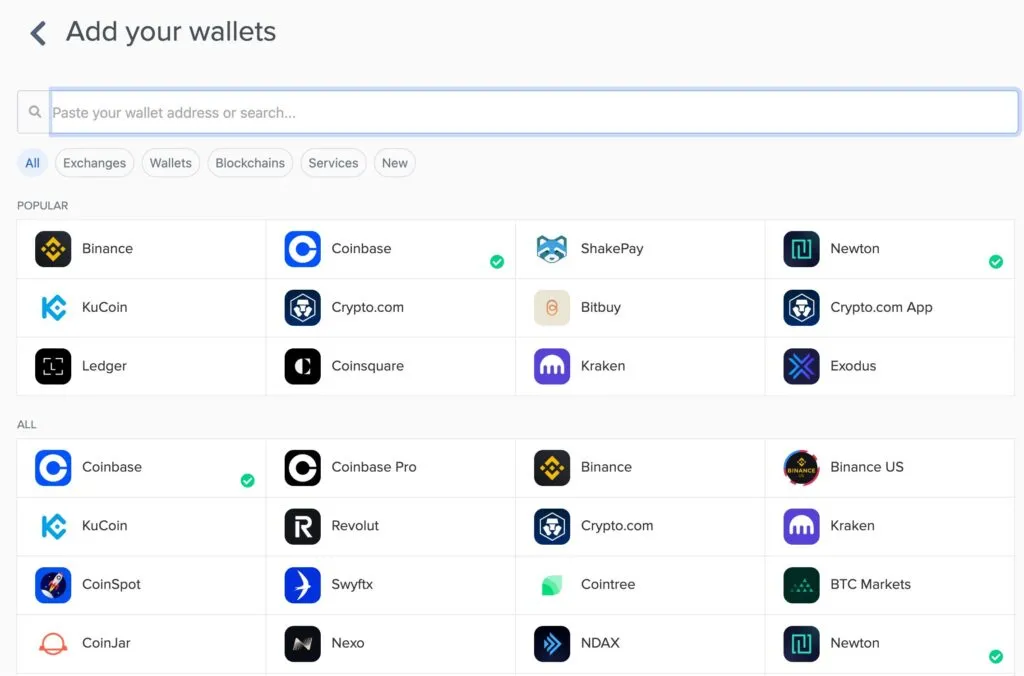
Koinly supports hundreds of exchanges and services. In my own use, the Canadian platforms I connected without trouble were Coinbase, Newton, and Bitbuy. Bitbuy is one to watch: its parent WonderFi was acquired by Robinhood, which closed the deal on June 1, 2026, and customers are being moved to the Robinhood app, so export your history now. Check Koinly's integration list for any other exchange before you commit, because I have not tested all of them.
Some exchanges sync automatically via API, while others need you to download and upload a transaction file. Koinly gives clear instructions for each, including step-by-step videos, which helped when I was starting out.
Koinly is not limited to exchanges. It also handles non-custodial wallets like Ledger, Trezor and MetaMask, and the Telegram wallet, so you can track crypto wherever you hold it.
How Do You Use Koinly In Canada?
1. Connect Wallets And Exchanges
Sign up on the Canadian page, go to Wallets and click Add exchange or wallet.
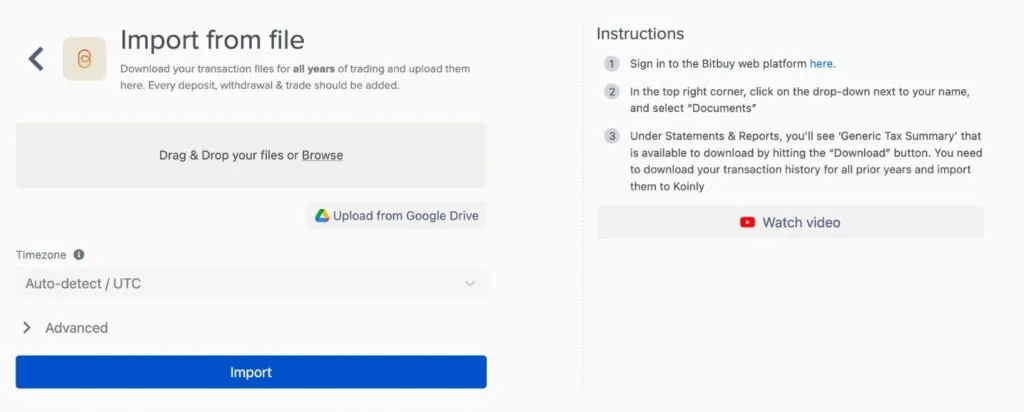
Pick the exchange you want and choose how to import: API, public wallet address, or CSV upload. I connected my exchanges without any trouble, but if you are not tech-savvy, go to your account on the exchange, download your transaction history as a CSV, and upload that. All exchanges should let you do this.
2. Review Transactions
Once imported, review your transactions under the Transactions tab.
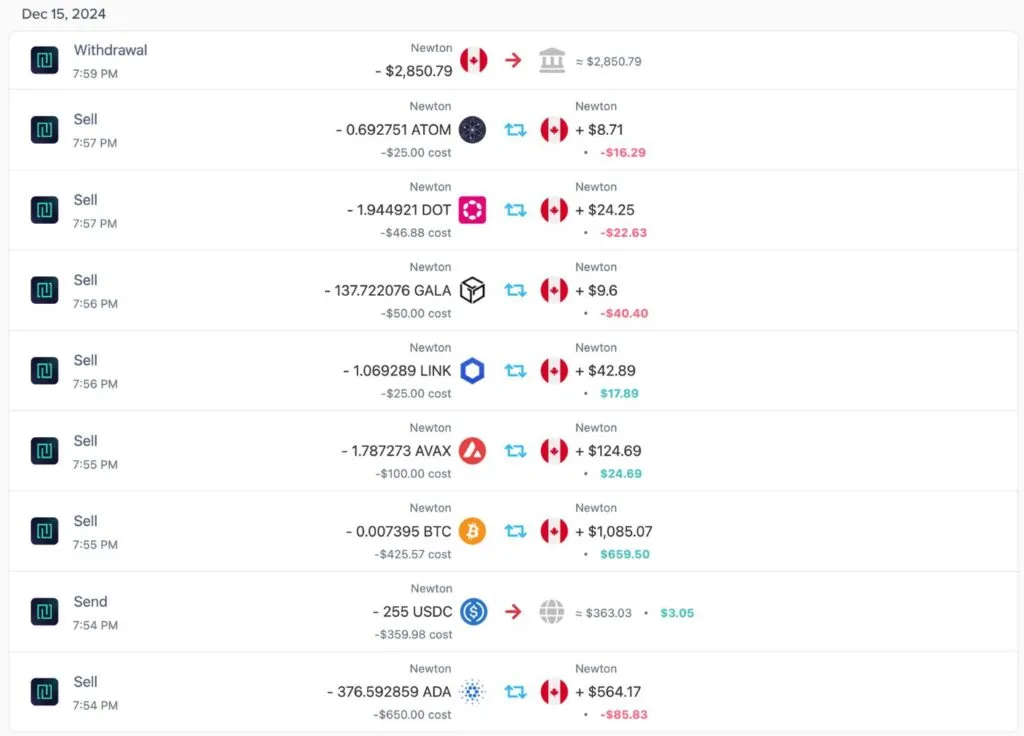
Review them carefully, because Koinly is not always 100% accurate. It tags transactions automatically as a buy, reward, cost and so on, and the tag is not always right.
I noticed that for one of my transactions, Koinly got the value of one of the cryptocurrencies wrong, which meant it calculated our profit several times higher than it should have.
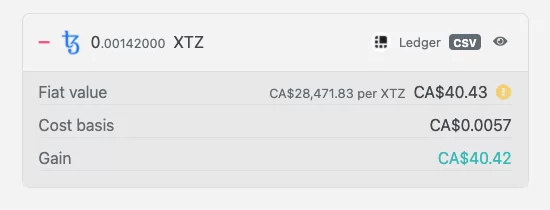
In the screenshot, Koinly says one Tezos (XTZ) is worth $28,471.83. We wish that were true, but at the time of writing Tezos was worth about $6. The mistake was obvious and we adjusted the value quickly. If a small discrepancy slips by, though, you could overpay or underpay tax. Going over the imported transactions is the job.
That said, it was only one occasion in 4 years, but the point is to double check. Koinly lets you edit values, retag transactions or delete them.
3. Download Your Tax Reports
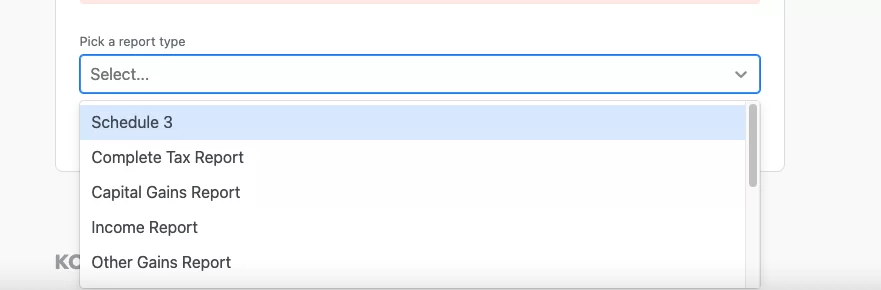
When you are happy with the data, go to Tax Reports and pick the tax year. Use the drop-down to select the forms. Koinly lets you download the reports you need for your Canadian return, and you submit those with your tax return, or hand them to your accountant.
How Much Does Koinly Cost In Canada?
Koinly sells plans per tax year, based on how many transactions you have. Remember that every swap, deposit and daily staking reward counts. When I imported my data I was surprised to find I had 1077 transactions, far more than I expected.
| Plan | Price Per Tax Year | Transactions | Who It Fits |
|---|---|---|---|
| Free | $0 | Import up to 10,000 | Checking your data before you buy |
| Newbie | $49 | Up to 100 | A light year of trades |
| Hodler | $99 | Up to 1,000 | Casual investors |
| Trader | $199 | Up to 3,000 | Active traders and stakers |
For most users I recommend the Hodler plan, which covers 1,000 transactions. It is the sweet spot for casual investors. If you are a day trader, move up to Trader. With a count like my 1077, the Newbie plan would not come close.
I think Koinly is fairly priced for what it does, especially next to hiring an accountant who understands crypto. I genuinely think it is worth the cost, because it is the only tool I have found that handles crypto capital gains accurately. If you made fewer than about 20 transactions in a year, you may not need a tool like this.
The free plan is worth using first. Import everything, look at the transaction list and fix the errors, then pay only when you are ready to download.
Is Koinly Better Than CoinLedger Or Doing It By Hand?
| Option | Best For | The Catch |
|---|---|---|
| Koinly | Anyone with many trades, swaps or staking rewards | Needs a paid plan for reports, and a manual review |
| CoinLedger | A second opinion on a tax tool | Read my review for how it compares |
| CoinTracker | Comparing prices | I have not tested it. Check its Canadian pricing and average cost support yourself |
| Spreadsheet | A few simple sales | You must track CAD value and average cost for every transaction |
| Accountant who knows crypto | Business income, complex DeFi | Costs more, and still needs your records |
Oleg's takeI have tried other tax tools. CoinLedger is legit too, but in my opinion the rest fall short of Koinly.
What Records Does The CRA Want, And Does Koinly Cover Them?
The CRA wants, for each transaction, the units and type of crypto, the date and time, the CAD value, who or what the other party was, and your wallet addresses, plus opening and closing balances per coin. It also lists third-party software costs as a receipt to keep, and says to keep records for at least six years. A Koinly report covers the transaction-level data well. You still keep your own exports from each exchange, which the CRA says to download regularly in case a platform shuts down or stops serving Canadians.
What Changed For Koinly Users In October 2026?
- : Robinhood closed its WonderFi acquisition. Coinsquare and Bitbuy customers are being moved to the Robinhood app in phases, so export your history before you lose access.
- : The CRA updated its page on reporting crypto income. Its examples use the 50% capital gains inclusion rate.
- : The CRA updated its records guidance. It encourages electronic records, notes you may use third-party software, and says it does not endorse any product.
- : The proposed increase of the capital gains inclusion rate was cancelled. Koinly's gains still feed into the half-inclusion rule.
Final Word: Is Koinly Worth It For Canadians?
I think Koinly is a legit tool for anyone in Canada who has to complete a crypto tax return. The CRA's rules can be confusing, and Koinly takes some of the stress away. We used Koinly for our 2023 taxes and we will use it again. If you want to give it a try, sign up through the Canadian page. For the tax rules themselves, read my crypto taxation guide or run numbers in the free tax calculator.
Frequently Asked Questions
Is Koinly Legit In Canada?
Yes. I have used it since 2020 and filed my crypto taxes with it. The CRA does not endorse any software, so you are responsible for checking the numbers, and Koinly says an accounting firm (MNP) assessed its calculations against CRA guidance.
How Much Does Koinly Cost In Canada?
Koinly lists Newbie at $49 per tax year (up to 100 transactions), Hodler at $99 (up to 1,000) and Trader at $199 (up to 3,000). Check the currency shown at checkout, since I could not confirm a CAD version of the pricing page.
Does Koinly Have A Free Plan, And Is There A Free Tax Tool?
Yes. You can import up to 10,000 transactions and see your data for free, but you cannot see capital gains or download tax reports until you buy a plan.
If you only want a rough number first, try my free Canada crypto tax calculator.
Is Koinly Accurate?
Mostly, but not always. It once valued a Tezos coin at $28,471.83 in my account, and I fixed it by hand. Review every transaction before you file.
Does Koinly Work With Canadian Exchanges?
It connected without trouble to the Canadian exchanges I used, such as Coinbase, Newton and Bitbuy. Check Koinly's integration list for yours, and download a CSV if there is no API option.
Does Koinly File My Taxes For Me?
No. It generates the reports, including the one for Schedule 3, and works with TurboTax, but you or your accountant still file the return. I print my report and give it to my accountant.
Do I Need Koinly If I Only Buy And Hold?
Probably not. Buying and holding is not reported to the CRA. A tool starts to pay off once you sell, swap or stake, and especially with more than about 20 transactions a year.
Does Koinly Work In Canada, And What Tax Documents Does It Give Me?
Yes. It works out gains using Canadian average cost and produces the capital gains report for Schedule 3, and it works with TurboTax. The CRA wants transaction-level records for six years, which a Koinly report covers, but you should still keep your own exports from each exchange. The CRA does not endorse any software.
Is CoinTracker Better Than Koinly?
I have not tested CoinTracker and I did not verify its current Canadian pricing, so I cannot call it better or worse. Compare the per-tax-year price for your transaction count and check that it uses the Canadian average cost method. I have used Koinly since 2020 and rate it 9.5 out of 10.